Incremental loading
Incremental loading is the act of loading only new or changed data and not old records that we have already loaded. It enables low-latency and low-cost data transfer.
The challenge of incremental pipelines is that if we do not keep track of the state of the load (i.e., which increments were loaded and which are to be loaded), we may encounter issues. Read more about state here.
Choosing a write disposition
The 3 write dispositions:
-
Full load: replaces the destination dataset with whatever the source produced on this run. To achieve this, use
write_disposition='replace'in your resources. Learn more in the full loading docs. -
Append: appends the new data to the destination. Use
write_disposition='append'. -
Merge: Merges new data into the destination using
merge_keyand/or deduplicates/upserts new data usingprimary_key. Usewrite_disposition='merge'.
How to choose the right write disposition
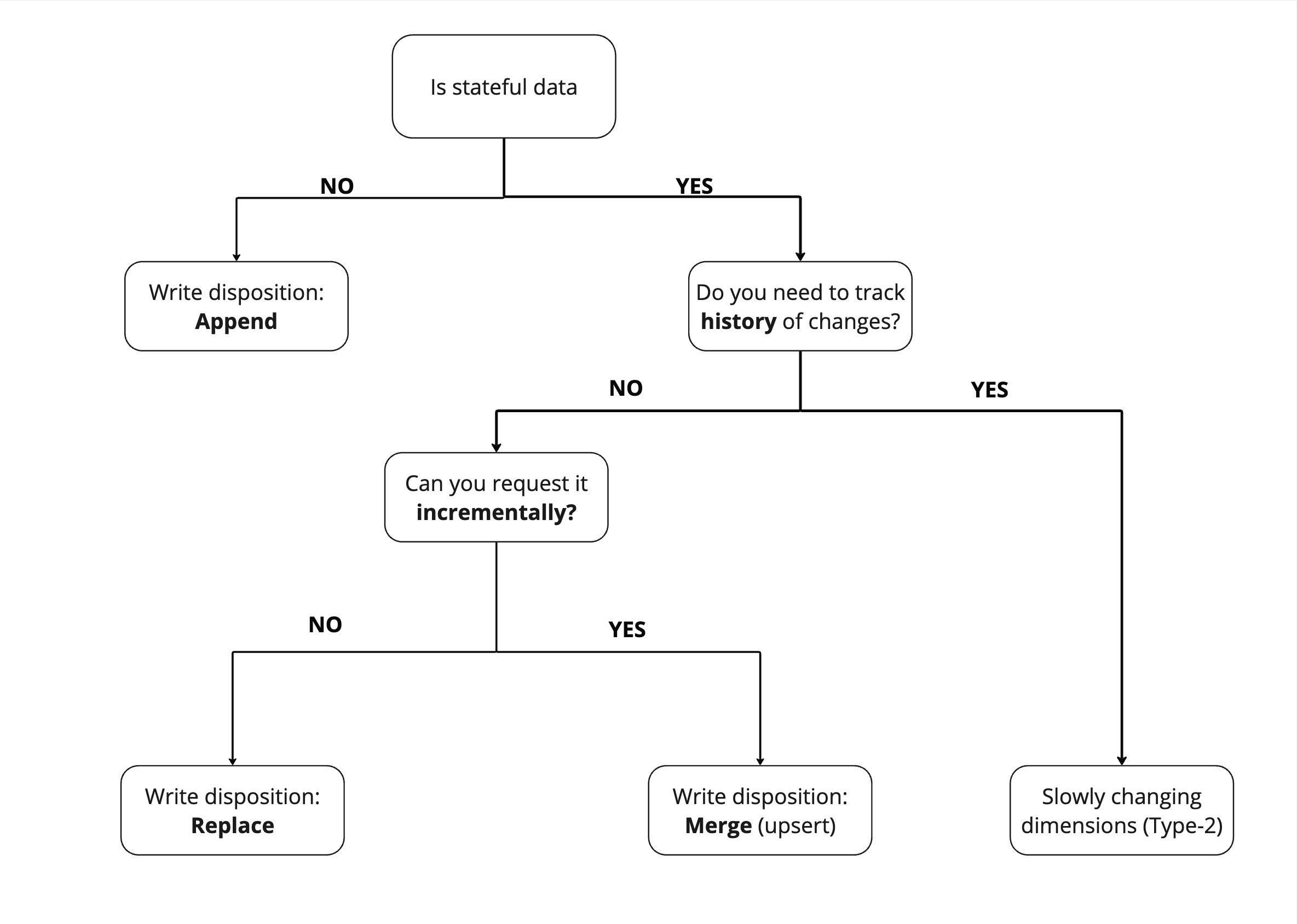
The "write disposition" you choose depends on the dataset and how you can extract it.
To find the "write disposition" you should use, the first question you should ask yourself is "Is my data stateful or stateless"? Stateful data has a state that is subject to change - for example, a user's profile. Stateless data cannot change - for example, a recorded event, such as a page view.
Because stateless data does not need to be updated, we can just append it.
For stateful data, comes a second question - Do you need to track history of change ? If yes, you should use slowly changing dimensions (Type-2), which allow you to maintain historical records of data changes over time.
If not, then we need to replace the entire dataset. However, if we can request the data incrementally, such as "all users added or modified since yesterday," then we can simply apply changes to our existing dataset with the merge write disposition.
Incremental loading strategies
dlt provides several approaches to incremental loading:
- Merge strategies - Choose between delete-insert, SCD2, upsert, and insert-only approaches to incrementally update your data
- Cursor-based incremental loading - Track changes using a cursor field (like timestamp or ID)
- Lag / Attribution window - Refresh data within a specific time window
- Advanced state management - Custom state tracking
Doing a full or partial refresh
You may force a refresh of merge and append resources by setting the refresh option on the dlt.pipeline constructor or in the run method:
drop_datatruncates all tables belonging to the selected resources and resets their state (including incremental). The schema is not changed.drop_resourcesdrops all tables belonging to the selected resources, from both the schema and the destination, and wipes their state. The tables are recreated with new data, and the stored schema history is erased (only the latest version is kept).drop_sourcesdrops all tables belonging to the sources being loaded and fully resets their schema and state.
Table truncation/drop happens when the load step starts, so a failed extract or normalization does not affect destination data.
Example:
import dlt

pipeline = dlt.pipeline("airtable_demo", destination="duckdb")
pipeline.run(sql_database().with_resources("users"), refresh="drop_data")
Above, we refresh the users table (a partial refresh) by truncating it, loading data from scratch, and leaving the other tables intact.
The refresh option is part of the pipeline configuration and may be set without changing the code. For example:
PIPELINES__GITHUB_PIPELINE__REFRESH=drop_data python github_pipeline.py
sets the refresh option for a single pipeline script execution.
Please refer to the pipeline documentation for more details.
All tables that belong to a fully refreshed resource are truncated or dropped on a refresh load, including nested tables and tables created by dispatching to many tables or as table variants.
Note that a table does not need to receive any data to get truncated or dropped.
Refresh with the "replace" write disposition
This method was recommended before the refresh option was available; there is now no good reason to use it. It requires modifying the schema tables, which
persists until the next, unmodified run. There may be a small performance improvement, since the refresh load is a replace that can be optimized with a table swap.
- In the case of a
merge, the data in the destination is truncated and loaded fresh. Currently, we do not deduplicate data during the full refresh. - In the case of
dlt.sources.incremental, the data is truncated and loaded from scratch. The state of the incremental is reset to the initial value.
Example:
p = dlt.pipeline(destination="bigquery", dataset_name="dataset_name")
# Do a full refresh
p.run(merge_source(), write_disposition="replace")
# Do a full refresh of just one table
p.run(merge_source().with_resources("merge_table"), write_disposition="replace")
# Run a normal merge - until now all tables were loaded in replace mode
p.run(merge_source())
Passing write disposition to replace will change the write disposition on all the resources in
repo_events during the run of the pipeline.
Next steps
- Cursor-based incremental loading - Use timestamps or IDs to track changes
- Advanced state management - Advanced techniques for state tracking
- Walkthroughs: Add incremental configuration to SQL resources - Step-by-step examples
- Troubleshooting incremental loading - Common issues and how to fix them